
Public song links
Paste a public song or Hook URL. Suno Downloader resolves the share link and reads the available track details.
Suno Downloader: paste a public song link to view details, preview, and download MP3, WAV, MP4, or cover art.
Try an example:https://suno.com/s/4lXXSg6RYga3bPyH
KEY TAKEAWAY
SunoPull works with public Suno links without a SunoPull account. Save MP3, WAV, or available MP4 video from a single song, or use dedicated batch, playlist, album, and creator-profile tools.
THE TOOL AT A GLANCE
SunoPull provides a single-song downloader plus dedicated tools for public song batches, playlists, albums, and creator profiles.
Paste a public song or Hook URL. Suno Downloader resolves the share link and reads the available track details.
Choose MP3, browser-generated 16-bit PCM WAV, or MP4 video when Suno provides a public video source. Cover art and available lyrics can also be saved for a single song.
Open the responsive page on desktop or mobile. No extension is needed; audio conversion runs in your browser.
Suno Downloader reports link, source, and conversion errors before saving a file.
Download public song links without creating a SunoPull account.
Use the batch tool for up to 20 public song links, or open dedicated tools for public playlists, albums, and creator profiles.
THREE SIMPLE STEPS
For a single song, paste its public URL and choose MP3, WAV, or an available MP4 video. Audio conversion runs in your browser; the video is saved as Suno provides it.
Suno Downloader needs one song or Hook URL. Copy its full address or Share link and confirm it points to the right track.
Choose MP3 for compact audio, WAV for editing, or MP4 when Suno exposes a public video for the song. Source availability varies by track.
Suno Downloader resolves the public song, prepares your selected format in the browser, and saves the finished file to your device.
Suno Downloader needs one public track URL. Copy the song's full address or Share link, not a title, profile, or playlist.
Open the song page and copy its complete suno.com/song/... address from your browser bar. Paste the link into Suno Downloader.

Open the song's action menu, choose Share, and copy the public link it provides. Check that it opens the right track, then paste it into Suno Downloader.
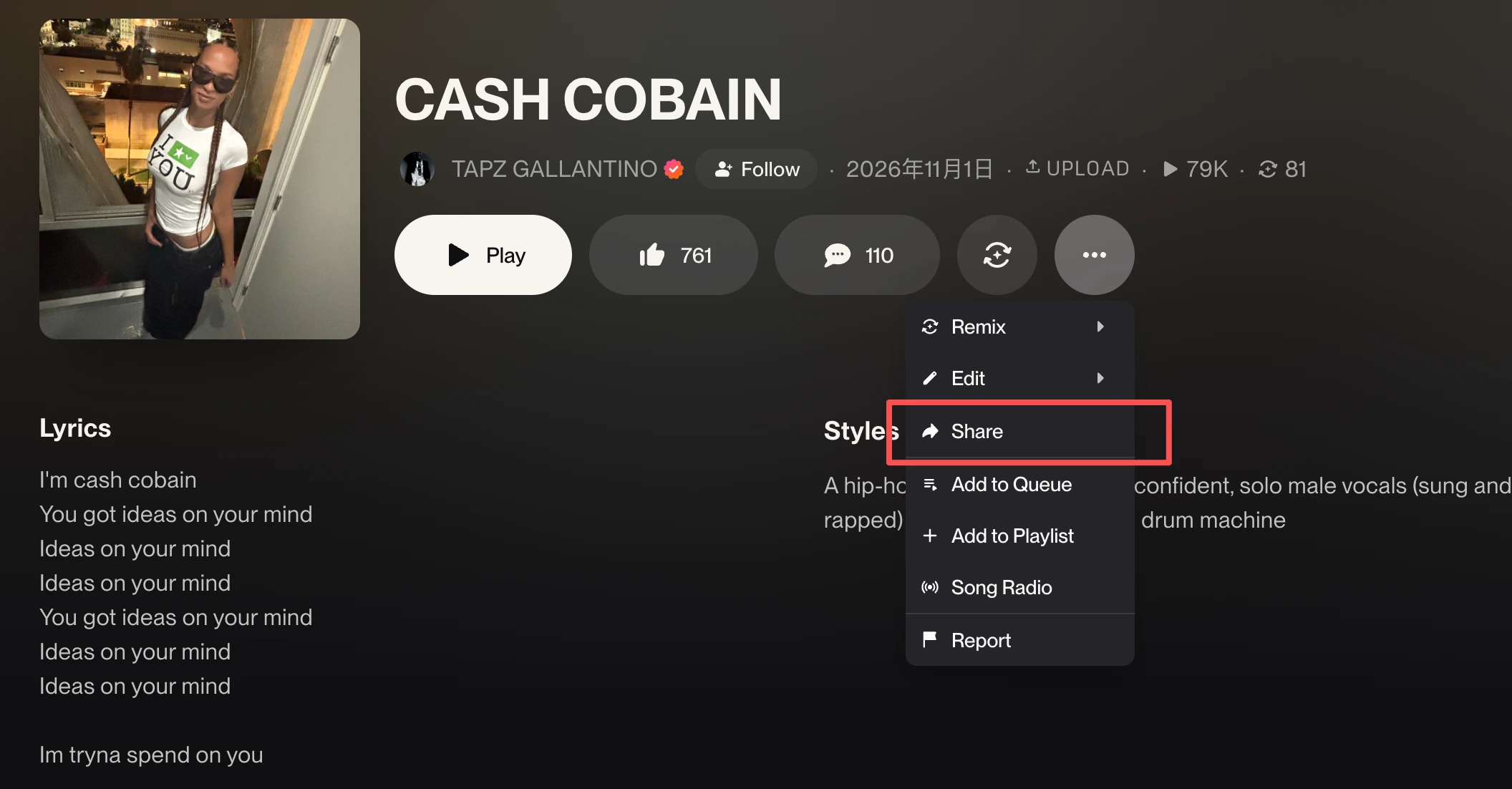
Public song links commonly use /song/, /s/ or /hook/. Suno Downloader accepts one song or Hook URL; profiles and playlists contain multiple tracks.
Your browser controls the save location. Keep the page open while Suno Downloader fetches and converts the audio; the file saves when processing finishes.
The file saves to your browser's default location. Your browser may show a save prompt or progress; keep this page open until conversion finishes.
Check Downloads or the browser's download list. Suno Downloader files may use the song title; use Download or Save As if audio opens in a tab.
The responsive Suno Downloader page works in mobile browsers. Check the browser manager or Files app for completed downloads.
PICK THE FILE THAT FITS
Choose MP3 for compact audio, WAV for an editing workflow, or MP4 to keep a public Suno video with its audio. MP4 availability depends on the song's public media source.
| Format | Media type | Relative size | Typical use |
|---|---|---|---|
| MP3 | Lossy compression | Smaller | MP3's smaller compressed files suit everyday listening and sharing. Suno Downloader sound quality still depends on the source. |
| WAV | Uncompressed | Larger | WAV is uncompressed and larger. Suno Downloader cannot restore missing detail by converting a compressed source. |
| MP4 | Video with audio | Varies by source and duration | MP4 keeps the public Suno video and its audio together. The video option appears only when a usable public video source is available for the song. |
A Suno Downloader WAV option is not automatically higher quality; conversion cannot restore lost audio detail.
COMPARE SUNO DOWNLOAD OPTIONS
SunoPull handles publicly available Suno links in a browser. The official route starts from your Suno Library or Workspace. Compare their formats, collection workflows, and account limits; use Suno's own Download controls when official download eligibility matters.
| Feature | SunoPull tools | Official Suno download |
|---|---|---|
| Starting point | Paste a public /s/, /song/, or /hook/ link in the single-song tool, or open the page for a playlist, album, batch, or creator profile. | In Library or Workspace, choose More Actions, then Download. |
| Sign-in | No SunoPull account is required for public links. Private or unpublished tracks are not accessible through public-link tools. | Use your Suno account to access downloads from your Library or Workspace. |
| Formats | MP3, browser-generated 16-bit PCM WAV, and MP4 video when a public video source is available; cover art and lyrics may be available for a single song. | MP3 is available across plans; WAV is available to Pro and Premier on suno.com. Video is available for songs, with options varying by song, plan, feature, and device. |
| Multiple songs | Paste up to 20 individual public song links in the Batch Downloader. Save selected tracks separately or package them in browser-generated ZIP files. | Select multiple songs in your Library or Workspace and download the selection as a ZIP. |
| Playlists and albums | Dedicated public Playlist and Album Downloaders show tracks in collection order and let you select tracks for a ZIP. | The official download flow works from songs in your Library or Workspace; use it for the tracks available to your account. |
| Creator profiles | Browse a creator's public songs and albums, then open a matching SunoPull tool for the link you want to use. | Find and download songs through your own Library or Workspace. |
| Metadata export | Export selected batch song details as CSV or JSON for spreadsheets and archives. | Suno's song-download guide describes audio/video files and ZIP downloads, not a CSV or JSON metadata export workflow. |
| Allowance and rights | SunoPull does not read your Suno allowance or establish usage rights. Temporary service rate limits may apply. | Plan download allocations and usage rights are governed by Suno's current account rules and Terms. |
Choose the SunoPull tool that matches your link:
SunoPull is a third-party public-link tool and cannot confirm download eligibility or grant usage rights. Suno formats, allowances, and rules can change; use the official Download flow when an approved Suno download is required. Official Suno download help · official song download steps · download allowances · Suno Terms
SAMPLE SUNO SHARE LINK
Use this public share URL to see the expected link format for the single-song tool. Paste the link, then choose MP3, WAV, MP4 video, or another available file.
https://suno.com/s/4lXXSg6RYga3bPyHLINK HELP
Suno Downloader needs a complete public Suno song link and a media source that Suno makes available to the page.
Paste the full suno.com/song/, /s/, or /hook/ URL into Suno Downloader. Remove spaces and confirm the song ID is present.
Open the link in a private window. If it needs a Suno session or the song is private, Suno Downloader cannot access it here.
If Suno opens but a file does not, retry later. Suno Downloader cannot fix source or network outages.
GOOD TO KNOW
Paste a public Suno song link, choose MP3, WAV, or an available MP4 video, and start the download. Audio conversion runs in your browser; the video is saved as Suno provides it.
Yes. Paste a public Suno song link, choose MP3, and download the converted file. The output bitrate is 320 kbps; the source audio still determines the final sound quality.
Suno Downloader resolves public /s/, /song/, and /hook/ links when Suno exposes a public song page and media source. Changes to Suno's page or media format can affect availability.
The single-song and batch tools offer MP3, browser-generated 16-bit PCM WAV, and MP4 video when a public video source is available. Cover art and lyrics may also be available for a single song. WAV conversion cannot restore detail already lost in a compressed source.
No SunoPull account is needed for public song links. Private links cannot be resolved unless Suno makes the song page and media source publicly available.
Use a modern desktop or mobile browser with audio decoding support. Suno Downloader runs in the browser, so no separate app or extension is needed.
There is no account-based daily allowance configured for Suno Downloader. Temporary request limits may apply to keep the public service available.
Check that the URL is complete, public, and uses /s/, /song/, or /hook/. If the page opens but conversion fails, retry later because the source or network may be temporarily unavailable.
No app installer is required to use this page; open SunoPull in a browser. The site does not provide or distribute a Suno app.
Yes. Suno Downloader converts the available public audio source to an MP3 encoded at 320 kbps. A higher output bitrate does not add detail beyond the source audio.
Yes. Use the SunoPull Playlist Downloader for a public playlist, the Album Downloader for a public album, or the Batch Downloader for up to 20 individual public song links. The Profile Downloader helps browse a creator's published songs and albums.
Use a public song or Hook URL with /s/, /song/, or /hook/. Copy the complete address from the song page or Share menu; a title is not a link.